songoftruth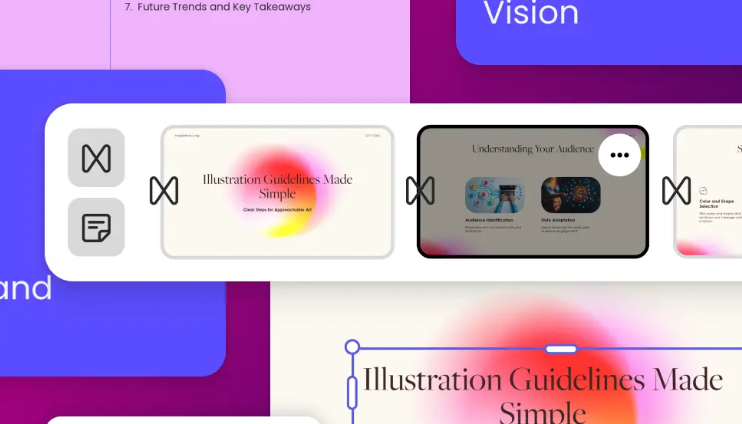
We’ve all been there, trapped in a dimly lit conference room or a stale Zoom call, watching someone read text-heavy slides in a monotone voice. It’s called “Death by PowerPoint” for a reason. In our modern, distraction-heavy world, a boring presentation isn’t just a missed opportunity; it’s a drain on collective productivity. The problem usually isn’t the data—it’s the delivery. We try to cram every spreadsheet, every bullet point, and every “next step” into a single file, hoping that sheer volume will equate to value. Spoiler alert: it doesn’t.
The real challenge is the “blank page anxiety.” You know what you want to say, but the thought of spending four hours hunting for the right icons, aligning text boxes, and picking a color scheme that doesn’t look like a 2004 bank brochure is exhausting. This is where the workflow has shifted. To bypass the tedious manual labor and jump straight into the creative storytelling phase, many professionals now use the AI ppt maker from Adobe Express to generate a cohesive visual foundation. It’s not about letting a machine do your thinking; it’s about letting a tool handle the “pixel-pushing” so you can focus on the narrative that actually moves the needle.
Why “Good Enough” No Longer Cuts It
In 2026, the bar for visual communication has never been higher. Your audience spends their free time scrolling through high-production social media feeds and sleek app interfaces. When they switch to “work mode” and see a cluttered, disorganized deck, their brains naturally tune out.
A great presentation functions like a guided tour. You are the guide, and the slides are the landmarks. If the landmarks are confusing or ugly, people lose interest in the journey. Modern design is moving toward minimalism and movement. We are seeing a shift away from static, text-heavy slides toward dynamic, image-led stories that feel more like a short film than a corporate lecture.
Three Rules for a “Human” Presentation
If you want to connect with people, you have to design for people. Here are three principles that will instantly elevate your next project:
1. Kill the Bullet Points
Bullet points are where ideas go to die. They encourage the audience to read ahead of you, which means they stop listening. Instead, try the “Assertion-Evidence” model. State your main claim in a clear, bold sentence at the top, and use the rest of the slide for a visual that proves your point.
2. The Rule of Three
The human brain is remarkably good at remembering things in groups of three. Three pillars of growth. Three phases of a project. Three reasons to buy. If you have five points, see if you can group them into three broader categories. It makes your information “sticky.”
3. Design for the “Back of the Room.”
Whether you’re in a physical room or someone is viewing your deck on a smartphone, size matters. If your font is smaller than 24pt, it’s too small. High contrast and large, legible typefaces signal confidence. If you have to say “I know this is hard to see, but…” then the slide shouldn’t be there at all.
Making it Personal: The Power of Social Proof
Data tells, but stories sell. If you’re presenting a new marketing strategy, don’t just show a chart of projected ROI. Include a slide with a photo of a real customer and a quote about their pain points. When you put a human face on the screen, the energy in the room shifts. People stop looking at their phones and start looking at you.
This is the “secret sauce” of top-tier content creators. They don’t just provide information; they provide context. They explain why the numbers matter to the person sitting in the third row.
Actionable Hacks for Your Next Deck
- Use High-Quality Icons: Stop using clip-art. Use clean, consistent vector icons to represent complex ideas.
- The “Squint Test”: Squint at your slide. If you can’t tell what the most important element is while your vision is blurred, your layout is too busy.
- Consistent Transitions: Avoid the “Star Wars” wipes. Simple fades or “push” transitions keep the flow professional and unobtrusive.
- End with a “Micro-Action”: Don’t just say “Questions?” End with a slide that clearly states the very next thing you want the audience to do.
Final Word: Reclaiming Your Time
At the end of the day, a presentation is just a tool to facilitate a conversation. The goal of using modern, intelligent design software isn’t just to make things look pretty—it’s to reclaim your time. Every hour you don’t spend fighting with a software interface is an hour you can spend refining your message, talking to your team, or actually executing the ideas you’re presenting.
We are living in an era where the barrier between a “good idea” and a “great presentation” has virtually disappeared. The tools are ready. The only question is: what story are you going to tell?
Would you like me to help you brainstorm a high-impact opening hook for your next specific presentation topic?

 writer